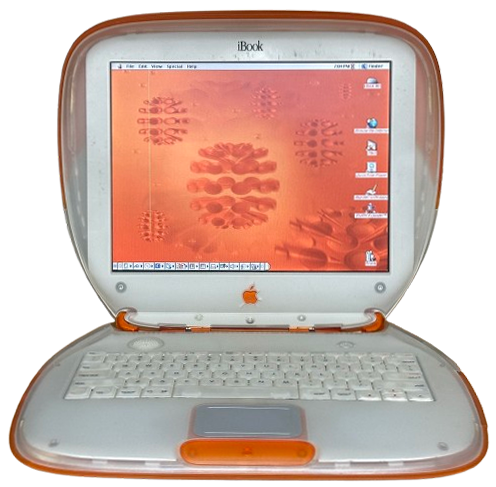
Apple iBook Clamshell
The iBook was released in July 1999 as Apple's new-generation consumer laptop. It used an iconic iMac-inspired design of translucent plastic paired with colorful rubber.
The original 1999 release came in Blueberry or Tangerine. In February 2000, they released a Special Edition model, which came in Graphite and used a faster 366MHz processor. Then, in September 2000, Apple released the second generation of the Clamshell, which used a shinier plastic, added FireWire, optional DVD-ROM, and came in three colors (Graphite, Indigo, and Key Lime, which was exclusive to Apple's online store).
Specifications
| Spec | iBook (Original) | iBook (Special Edition) | iBook (FireWire) | iBook (FireWire Special Edition) | ||
|---|---|---|---|---|---|---|
| Release Date | July 1999 | February 2000 | September 2000 | |||
| Discontinuation Date | September 2000 | May 2001 | ||||
| Processor | PowerPC G3 @300MHz Bus Speed: 66MHz |
PowerPC G3 @366MHz Bus Speed: 66MHz |
PowerPC G3 @466MHz Bus Speed: 66MHz |
|||
| RAM | PC66 SDRAM, 1 slot Standard: 32 or 64MB Soldered Maximum: 544 or 576MB |
PC66 SDRAM, 1 slot Standard: 64MB Soldered Maximum: 576MB |
||||
| Hard Disk | 2.5" IDE Standard: 3.2 or 6GB |
2.5" IDE Standard: 6GB |
2.5" IDE Standard: 10GB |
|||
| Display | 12.1" TFT LCD @800x600 | |||||
| GPU | ATI Rage Mobility (4MB VRAM) | ATI Rage Mobility 128 (8MB VRAM) | ||||
| Main Battery | Lithium Ion | |||||
| PRAM Battery | Soldered Supercapacitor | |||||
| Power Supply | RCA-Style Jack | |||||
| Disk Drives | 24X CD-ROM Drive | 4X DVD-ROM Drive | ||||
| PC Cards | None | |||||
| Networking | - 56k Modem - 10/100 Ethernet - 802.11b AirPort WiFi (Optional) |
|||||
| Other I/O | - 1x USB 1.1 - 1x Line Out |
- 1x USB 1.1 - 1x FireWire 400 - 1x Line Out (doubles as composite out via adapter) |
||||
| Pointing Device | Trackpad | |||||
| Minimum Mac OS | Mac OS 8.6 | Mac OS 9.0.4 | ||||
| Maximum Mac OS | Mac OS X 10.3.9 (10.4.11 unofficially) | Mac OS X 10.4.11 | ||||
Upgrades
The XGA Mod
It is possible to install an LCD panel from a later "Snow" G3 iBook to bring your 2nd-generation clamshell up to a 1024x768 resolution. This mod not only requires a later LCD, but also the Clamshell LCD cable for LG displays, weren't weren't terribly common. If you're lucky, your Clamshell will already have an LG LCD installed with the correct cable, but if you're not, tracking down one might be diffficult.
This mod ONLY works on 2nd Generation FireWire Clamshells.
Can I put a DVD-ROM drive in a CD-ROM model?
Yes, and no. Any 2nd generation iBook Clamshell can use a DVD drive, but the first generation clamshells can't due to a lack a video memory, and other compatibility issues. You can totally make a DVD equipped Indigo though.
G4 Upgrade
The G3 processor in the Clamshell is soldered straight to the motherboard. However, it is pin-compatible with certain G4 chips, allowing upgrades if you have the right equipment and skills to perform BGA soldering work. This has been successfully done before by dosdude1. You will also need to add a fan in somewhere to allow the chip to keep cool.
But how do I get an SSD in it?
While a pain to take apart, once you get a Clamshell apart, SSD upgrades are easy. I would recommend going with an IDE-mSata adapter. While you can cheap out and get an IDE-CF or IDE-SD adapter, they will be a bit sluggish on OS X.
Max RAM?
576MB PC66 SO-DIMM. Install one 512MB stick along with the soldered RAM.
Max HDD Capacity?
The iBook Clamshell may have trouble using internal hard drives or SSDs larger than 120GB.
Resources
 Service Manual (iBook) |
Service Manual (iBook FireWire) |
Capacitor Reference |
|---|
Replacement trackpad flex cables
A user on Reddit reported that this part works as a replacement for the Clamshell's easy to rip trackpad ribbon cable. Know that it will need to be bent to fit, and the user will have to shave a bit off the sides for it to fit in the ZIF socket.
Link to the Reddit threadCommon Faults & Maintenance
The iBook Clamshell is generally reliable laptop, but they do have some cosmetic and build issues that can be problematic.
Missing Parts
The colorful Apple logo and leaf on the top display housing are held on with weak glue that dries out with time. Due to this, a large number of clamshells are missing one or both of these parts. In addition, it's very easy to remove the optical drive bezel off of one, so many are missing that part as well.
Brittle Plastic
The iBook Clamshell isn't immune to brittle plastic. These don't tend to fall apart like some Apple laptops do, but they still suffer from cracks around screwposts, the handle, around the apple logo on the display bezel, and more. These cracks are usually cosmetic only, and these things are still built tough.
One non-cosmetic issue I have run into myself is when the screw wells for the four screws inside the battery compartment break. This can cause the top case to seat in a way where the mouse button won't click.
Supercapacitor Leaking
Instead of a battery, the clamshell iBooks use a small button-sized supercapacitor for backing up PRAM info. I've heard multiple accounts of these supercaps beginning to leak in their age. It's probably a good idea to replace this cap just to avoid any future problems.
Other Notes
The DC power jacks can short against the top metal shield if you're not careful during reassembly after taking one apart. Be careful.
I've run into some weird failures with my own units. I've had two motherboards both lose the ability to power internal hard drives. They would otherwise start up, boot from CD-ROM even, but would not spin up any hard drive that I installed. One of the two boards came to me in that state, but the other failed in this way after I took it apart to upgrade the hard drive. I smelled that electronic burning smell after first power-on, and it didn't start. After taking it apart and back together again, it started, but was then in that failure mode. My assumption is that there is some point that's easy to short out on the board during reassembly that will cause this failure. Close scrutiny of the boards failed to reveal any obvious signs of burning or damage.
Gallery
Coming soon.